
TPP · Trust Framework · Onboarding

Onboarding 3 min read

The onboarding process to the Trust Framework works in tandem with the licensing processes defined by the Central Bank of the UAE (CBUAE).

01 When You Can Onboard

Sandbox or Production, depending on your licence stage

As a Third-Party Provider (TPP), you may begin onboarding to the appropriate Trust Framework environment based on your licensing status:

If you have not yet started your Open Finance licensing process and are interested in finding out more, please contact [email protected].

02 Requesting Sandbox Onboarding

What to send to [email protected]

Once the CBUAE has confirmed receipt of your licence application, send the following to [email protected] to begin sandbox onboarding:

📨 Email template

To:[email protected]
Subject: Trust Framework Sandbox Onboarding Request — [Your Organisation Name]

Dear Nebras Support,

I wish to proceed with onboarding my organisation to the Trust Framework Sandbox. Please review the attached documents:

1. CBUAE Licence / Letter of Intent
A copy of your valid Central Bank of the UAE (CBUAE) Licence, or a Letter of Intent along with the Business Proposal submitted to the CBUAE.

2. Organisation Details
The completed Organisation Details form.

3. Primary Organisation Admin Details
The completed Primary Organisation Admin form with the nominated administrator's details.

4. Primary Organisation Admin Approval
A signed letter from your Chief Compliance Officer confirming the approval of the designated Primary Organisation Admin.

03 Primary Organisation Admin

The single point of contact for your organisation

As part of your licence application, you must nominate a Primary Organisation Admin. The Primary Organisation Admin will act as your organization's main point of contact with Nebras and the CBUAE during onboarding and ongoing operations.

Within the Trust Framework, the Primary Organisation Admin will:

  • Serve as system administrator
  • Manage user access
  • Appoint technical contacts
  • Coordinate the signing and submission of required legal documentation
04 Access & Registration

Receiving the invitation email and completing sign-up

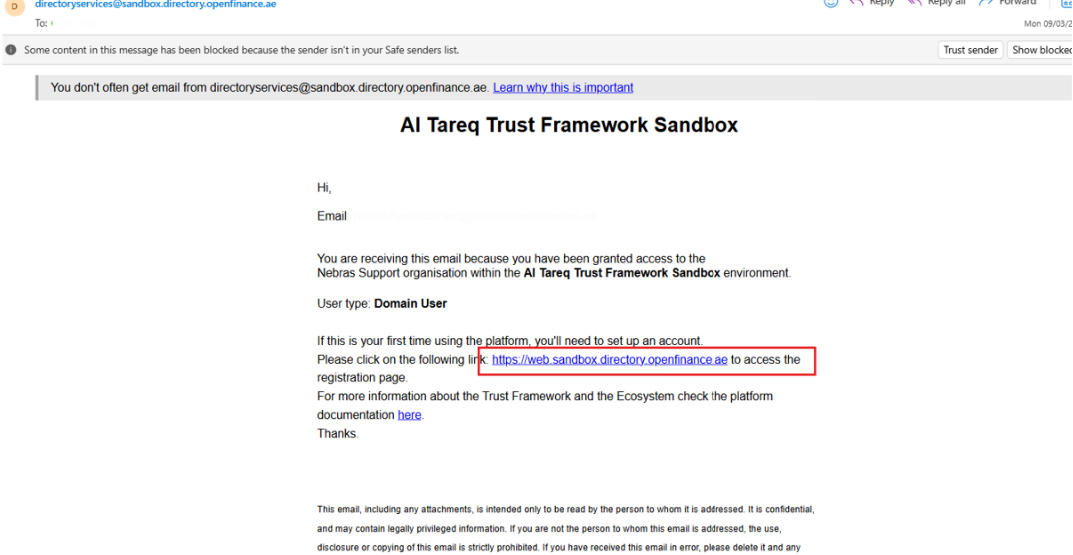
Once your onboarding request has been accepted, the Primary Organisation Admin will receive an invitation email from the Trust Framework platform. They can complete registration by following the steps in the Sign Up guide.

Registration Email
Registration Email
Agreement signing required

In addition to the steps in the Sign Up guide, as part of registration, the Primary Organisation Admin will receive the TPP Agreement for electronic signature. This document must be signed by an authorised signatory — someone with the authority to legally bind the organisation. The Primary Organisation Admin must coordinate this signing before the organisation can access the Trust Framework.

After the Primary Organisation Admin account is set up, they can add additional users within the Trust Framework platform.