
Authentication 3 min read
When a TPP initiates a consent journey, the API Hub redirects the end user (Payment Services User) to the LFI's Authorization Endpoint so the end user can prove their identity. This is the authentication step — the end user demonstrates to the LFI that they are who they claim to be, using the same credentials and methods they use when accessing the LFI's own digital channels.
Authentication is distinct from authorization, which is the subsequent step where the authenticated end user reviews and approves the consent (e.g. selecting accounts, confirming a payment).
Where authentication sits in the consent flow
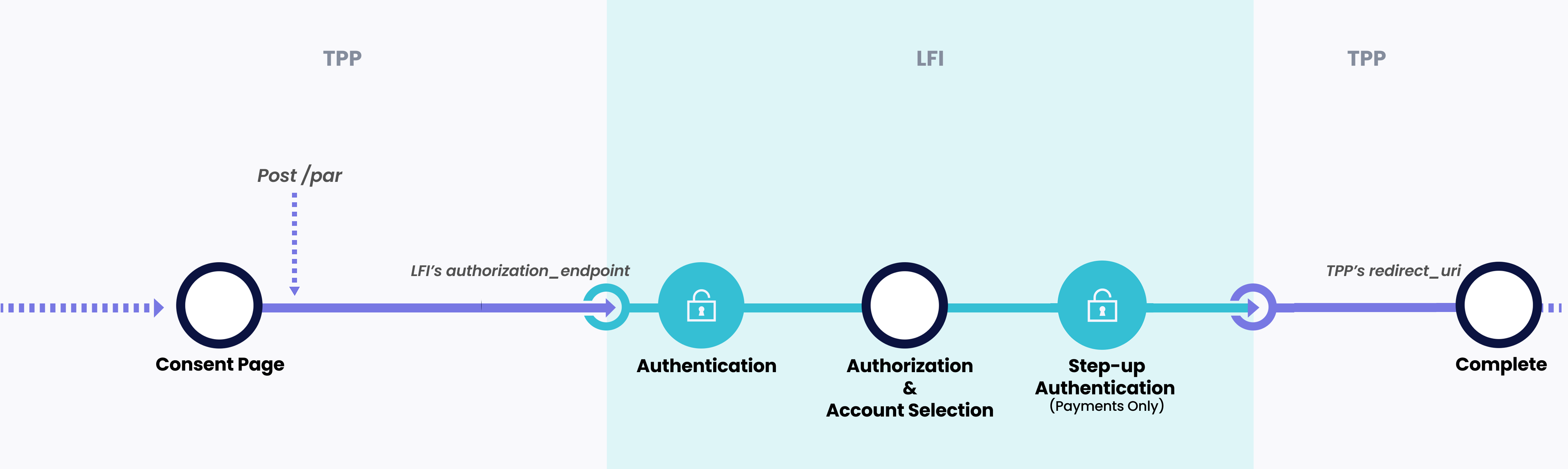
- 1The TPP creates a consent and receives a redirect URI from the API Hub
- 2The end user's device opens the LFI's Authorization Endpoint
- 3The LFI authenticates the end user using Strong Customer Authentication (SCA)
- 4The LFI presents the consent for authorization
- 5The LFI completes the interaction and redirects back to the TPP
Principles
The following principles govern authentication in the Open Finance Framework:
01 LFIs authenticate
The end user MUST go through Multi-Factor Authentication (MFA) at their LFI. The API Hub does not perform end user authentication.
02 Parity of experience
The end user MUST be able to use the same authentication methods they use when accessing the LFI's own digital channels. Open Finance authentication MUST NOT be more obstructive, slower, or require more steps than the LFI's existing channels.
03 Single MFA ceremony
Unlike an LFI's online channels which may require authentication for login and again for sensitive actions, the Open Finance consent journey requires the end user to complete MFA once before authorization. The exception is step-up authentication for payment consents.
04 No obstacles
LFIs MUST NOT introduce unnecessary delay or friction during authentication. This includes advertising, language that discourages TPP usage, or additional steps beyond what is required for authentication.
05 Immediate challenge
The authentication challenge MUST be presented immediately on app open or page load, with no preceding splash, welcome screen, or tap-to-continue. The end user arrives from the TPP having already expressed intent to authenticate; no further action MUST be required to initiate the challenge. This takes precedence over parity with the LFI's own channels.
06 CX certification
The authentication experience will be reviewed for customer experience (CX) compliance as part of production certification.
App invocation
The LFI's Authorization Endpoint MUST support two scenarios based on the end user's device:
| Scenario | Behaviour |
|---|---|
| LFI app is installed | The Authorization Endpoint MUST open the LFI's native mobile app directly. No intermediate screens, browser pages, or app-store prompts may be shown before the app opens. |
| LFI app is not installed | The Authorization Endpoint MUST open a mobile-optimised web page where the end user can complete authentication. |
Both scenarios MUST be supported. The Authorization Endpoint is expected to directly open the native app when this is how end users typically interact with the LFI digitally.
Immediate authentication challenge
Whichever scenario applies, the authentication challenge MUST be the first thing the end user sees. No tap, button press, or intermediate screen may precede the challenge. Concretely:
| Channel | What “immediate” means |
|---|---|
| Native app — biometrics available | The native biometric prompt (Face ID, Touch ID, fingerprint) MUST fire automatically as the app opens. A “Log in with Face ID” button that the end user must tap to invoke the prompt is NOT permitted. |
| Native app — biometrics unavailable | Where the app falls back to a knowledge factor, the PIN or password entry screen MUST be shown immediately on app open. |
| Web page | The credential entry form (e.g. username and password fields) MUST be the first screen rendered. A preceding page with a “Log in” button that navigates to the form is NOT permitted. |
This requirement takes precedence over parity with the LFI's own digital channels. If the LFI's own mobile app or website requires the user to tap a login button before the authentication challenge is shown, that tap MUST NOT be present in the Open Finance journey — the end user has arrived from the TPP with explicit intent to authenticate and authorize, and any further action to initiate the challenge is redundant friction.