
User Experience 5 min read
When an LFI adopts CAAP, the end user's authentication and consent authorisation experience is delivered by CAAP — not by an LFI-operated application. This page describes what the end user sees, where the LFI is still on the path, and what is and is not the LFI's responsibility across the journey.
From the TPP to CAAP, via the API Hub
The journey starts in the TPP application. After the TPP requests a consent via POST /par against the API Hub, the TPP redirects the end user to the API Hub authorization endpoint with the returned request_uri. From there, the API Hub redirects the end user into CAAP for authentication and consent approval.
Without CAAP, the API Hub redirects the end user to the LFI's Authorization Endpoint, and the LFI authenticates and authorises the end user using its own mobile app or web journey, calling Headless Heimdall and the Consent Manager. With CAAP, the API Hub redirects to CAAP, and the LFI no longer operates that experience.
What the end user sees, screen by screen
The image below shows the full end user experience after the TPP creates the consent and the API Hub redirects the end user to a CAAP-using LFI — from EFR / UAE Pass authentication, through OTP and consent review, to the authorization page itself.
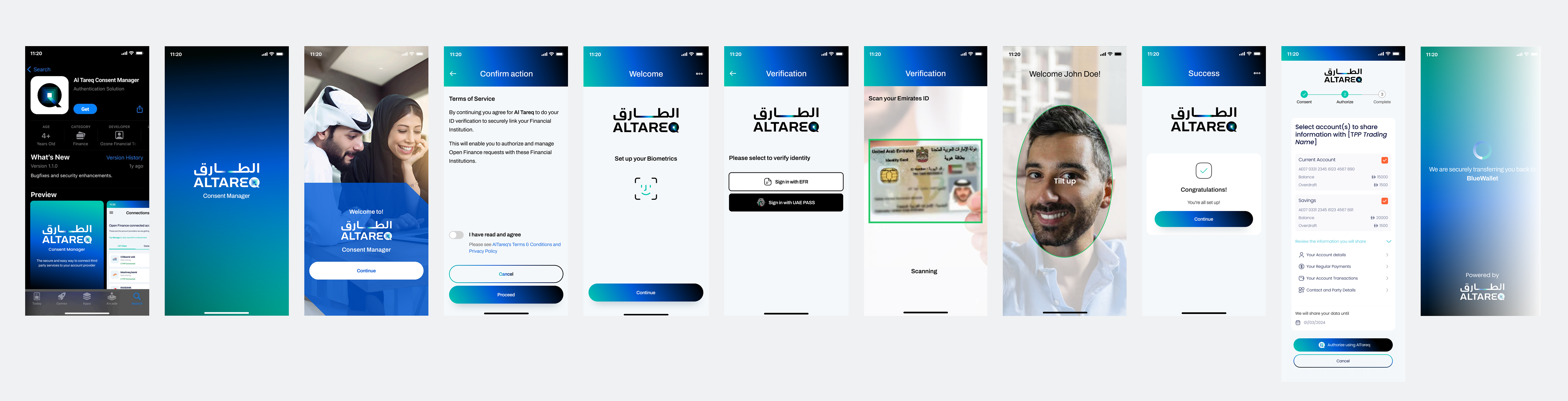
The authorization page shown is the Bank Data Sharing variant. CAAP renders a different authorization page for each consent type — the same surrounding journey (authenticate, register, review, confirm), with a layout suited to what the end user is consenting to. For comparison, see the equivalent journeys for Bank Service Initiation and Insurance Data Sharing.
The CAAP-side screens
CAAP renders a consistent authentication and consent journey across LFIs that adopt it. The end user progresses through the following stages:
- Identify. The end user provides identifying details (e.g. Emirates ID or other LFI-recognised identifiers).
- Challenge. CAAP issues a challenge against the LFI — calling the LFI's
/users/actions/challenge/initializeand/users/actions/challenge/completeCAAP Operations endpoints — so the LFI's authentication system verifies the end user. - Review consent. CAAP displays the requested consent (permissions, expiry, accounts, payment details where applicable). For consents carrying encrypted PII, CAAP calls the LFI's
/users/actions/pii/decryptendpoint to display cleartext to the end user. - Select accounts or policies. Where the consent requires selecting accounts or insurance policies, CAAP retrieves them via the LFI's CAAP-specific
/accounts,/accounts/{accountId}, and/{type}-insurance-policiesendpoints. - Validate. Before completion, CAAP calls the LFI's
/consent/actions/validateendpoint. If validation fails, the journey ends with the user-facing message returned by the LFI. - Confirm. The end user confirms the consent; CAAP completes the interaction with the API Hub, and the API Hub redirects the end user back to the TPP.
End user consent review and revocation
After the consent is authorised, the end user manages the consent in CAAP — not in the LFI's own consent management interface. CAAP exposes the list of active consents, their permissions and expiry, and the ability to revoke them. Revocations are propagated to the API Hub (the consent source of truth) and from there back to the LFI via the existing Ozone Connect Consent Events path.
The LFI's own Consent Management Interface requirements and UX guidance are not applicable when the LFI adopts CAAP — CAAP delivers that interface.