1
Consent
2
Authorize
3
Complete
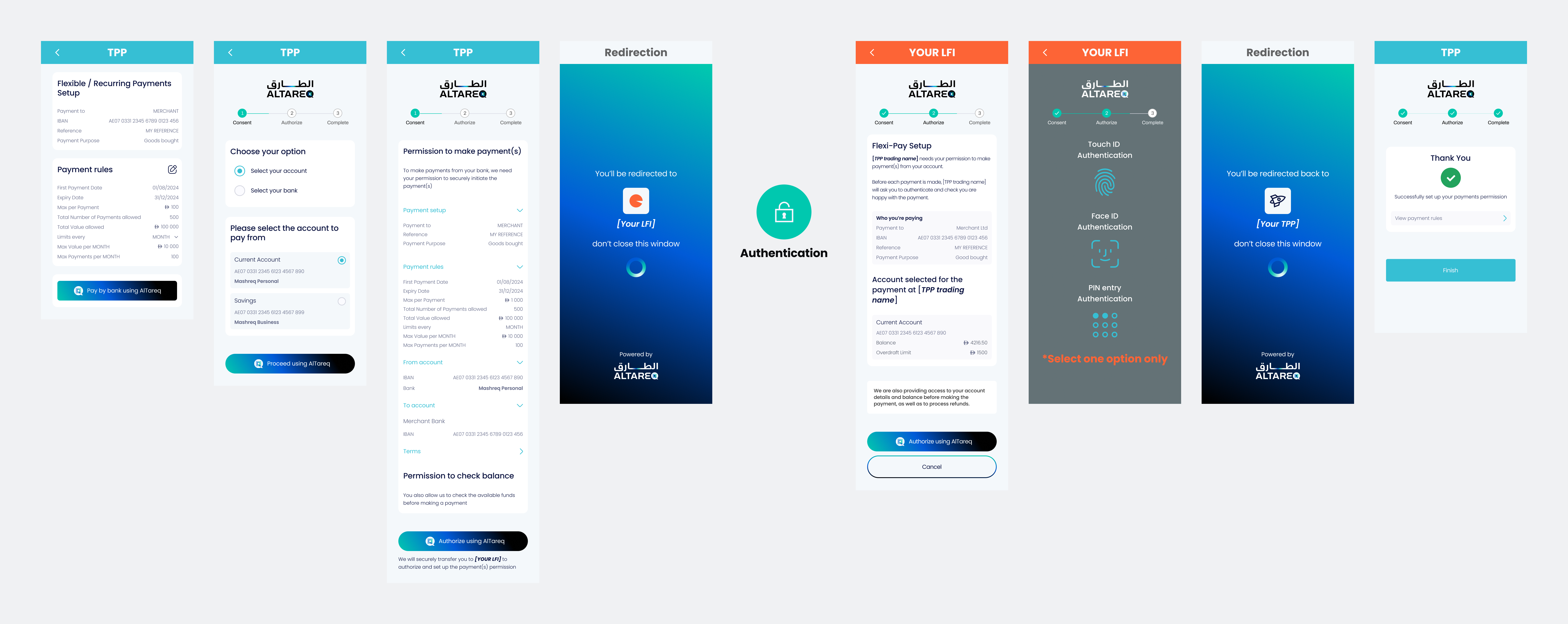
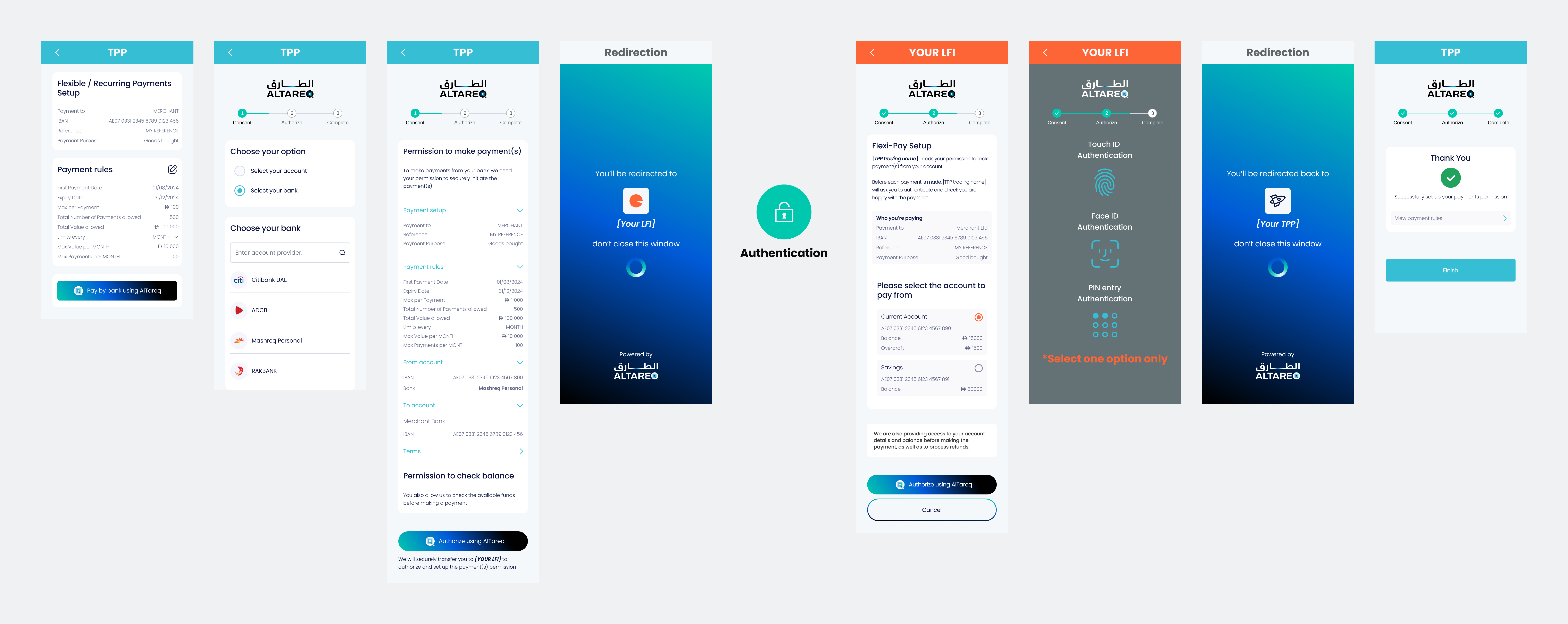
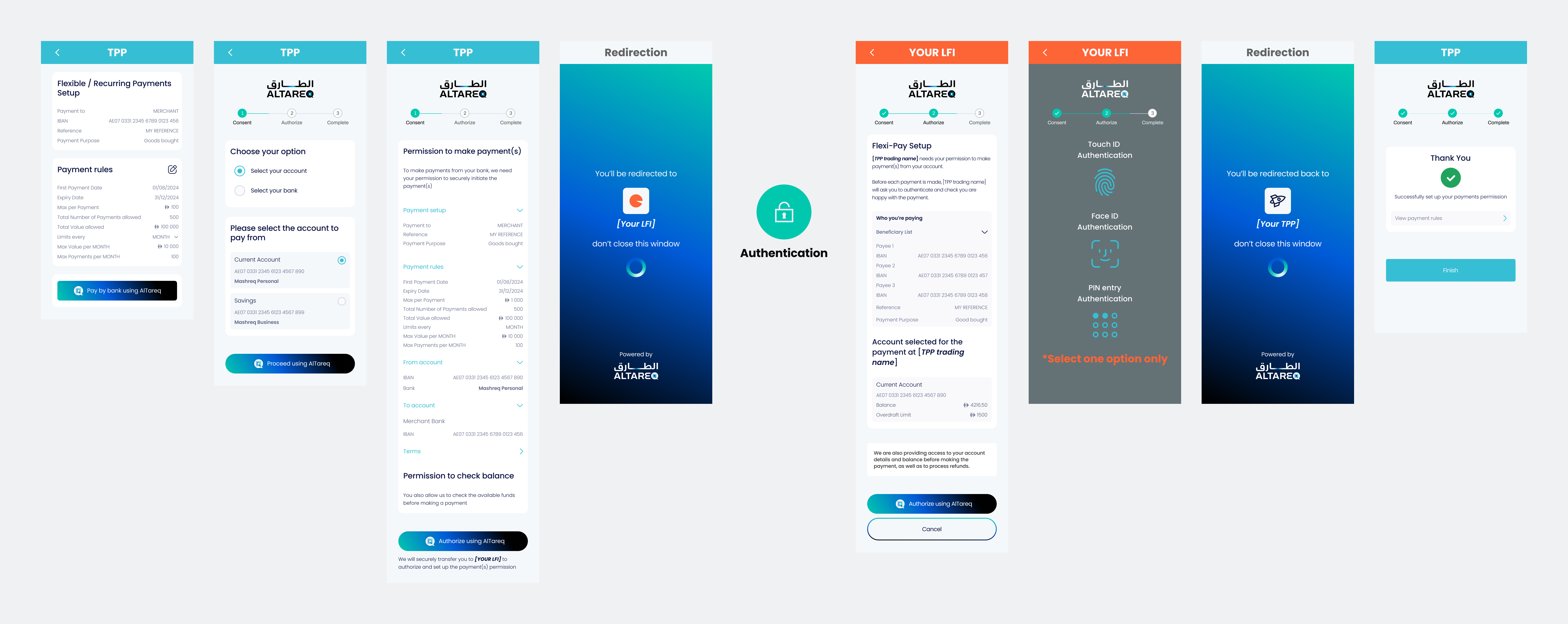
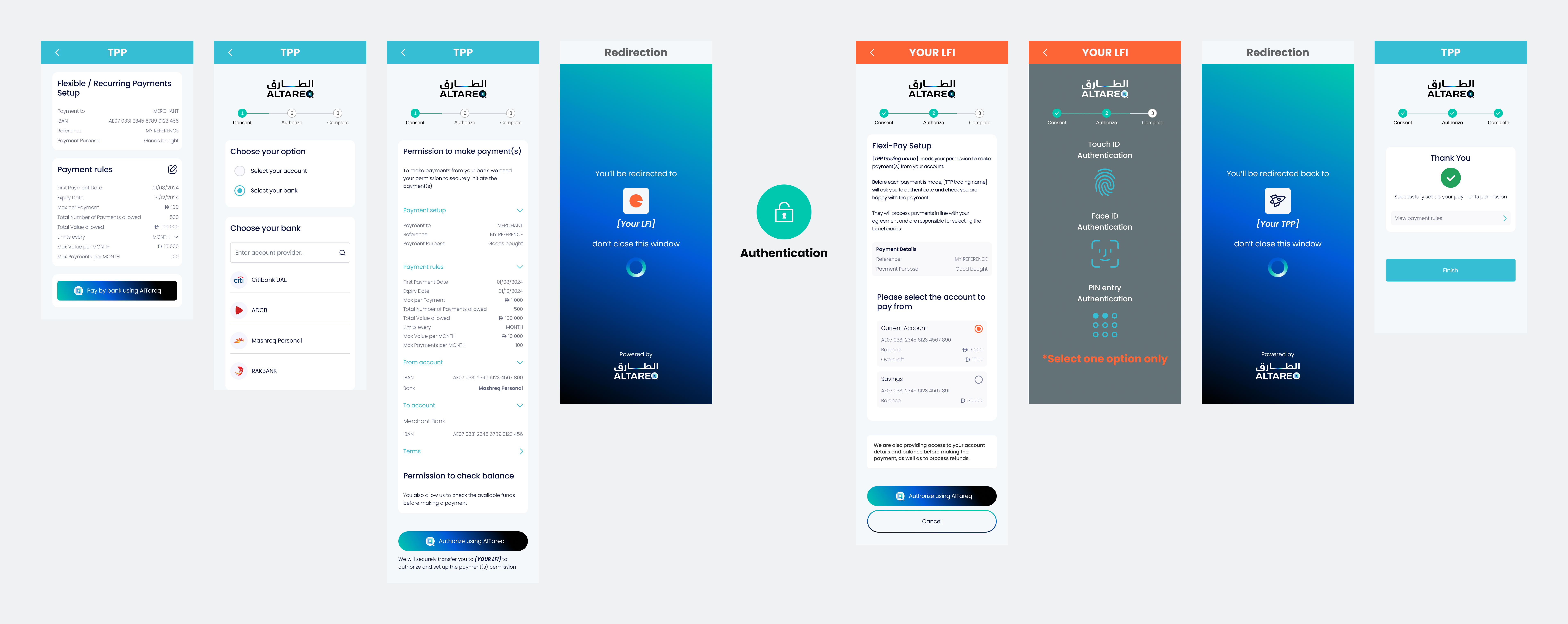
When a customer is redirected to you to authorize a Delegated SCA payment consent through Open Finance, you must present an Authorization Page that clearly explains the payment the customer is authorizing — that the TPP is seeking permission to initiate payments on their behalf, but the customer will be required to authenticate and approve each individual payment before it is executed — no payment will be taken automatically. The page must accurately reflect the payee and the nature of the delegated consent being granted.
The examples and interactive wireframes provided below define the expected structure, content, and behavior of the Authorization Page and must be followed.
While you may adapt visual elements such as color palette, fonts, and styling, you must not alter the meaning, clarity, or completeness of the payment information shown. The representation of AlTareq (including logos, naming, and action buttons) must be preserved at all times. The customer must be able to clearly understand what payment they are authorizing and that the authorization is part of the AlTareq ecosystem.
Your Authorization Page must be submitted as part of CX certification prior to production. Any material changes to a production Authorization Page must also be resubmitted for review and approval.
Customise the request body fields below and watch the Consent and Authorisation page previews update live.
Configure the mock accounts the authenticated user holds at their bank. The Authorisation Page will offer these accounts when the user picks a debtor account, or validate the Initiation.DebtorAccount against them when one is pre-selected by the TPP.
The presence or absence of Initiation.DebtorAccount in domestic_payment_pii determines whether the user selects their account at the LFI or if it is pre-selected by the TPP.
Passing a DebtorAccount reduces friction for users who have already selected their account within the TPP's own interface, but removes the user's ability to choose a different account at the LFI.
The presence or absence of creditors in Initiation.Creditor in domestic_payment_pii determines how the LFI presents payment recipient information to the user.
Initiation.Creditor | LFI Authorisation Page Behaviour |
|---|---|
| 1 creditor | The single payee's name and account details are displayed under "Who you're paying". (See Example 1) |
| 2–10 defined creditors | All specified payees are listed under "Who you're paying". (See Examples 2, 3 & 4) |
| Undefined (absent or empty) | A general message informs the user that the TPP is responsible for selecting beneficiaries at payment time. (See Example 5) |
The table below describes the text shown to users on the Authorization Page.
| Permissions | Text shown to user on Authorization Page |
|---|---|
ReadAccountsBasic | We are also providing access to your account details before making the payment. |
ReadAccountsDetail | We are also providing access to your account details before making the payment. |
ReadRefundAccount | We are also providing access to your account details in order to process a refund. |
ReadAccountsBasicReadAccountsDetail | We are also providing access to your account details before making the payment. |
ReadAccountsBasicReadBalances | We are also providing access to your account details and balance before making the payment. |
ReadAccountsBasicReadRefundAccount | We are also providing access to your account details before making the payment, as well as to process refunds. |
ReadAccountsDetailReadBalances | We are also providing access to your account details and balance before making the payment. |
ReadAccountsDetailReadRefundAccount | We are also providing access to your account details before making the payment, as well as to process refunds. |
ReadAccountsBasicReadAccountsDetailReadBalances | We are also providing access to your account details and balance before making the payment. |
ReadAccountsBasicReadAccountsDetailReadRefundAccount | We are also providing access to your account details before making the payment, as well as to process refunds. |
ReadAccountsBasicReadBalancesReadRefundAccount | We are also providing access to your account details and balance before making the payment, as well as to process refunds. |
ReadAccountsDetailReadBalancesReadRefundAccount | We are also providing access to your account details and balance before making the payment, as well as to process refunds. |
ReadAccountsBasicReadAccountsDetailReadBalancesReadRefundAccount | We are also providing access to your account details and balance before making the payment, as well as to process refunds. |