1
Consent
2
Authorize
3
Complete
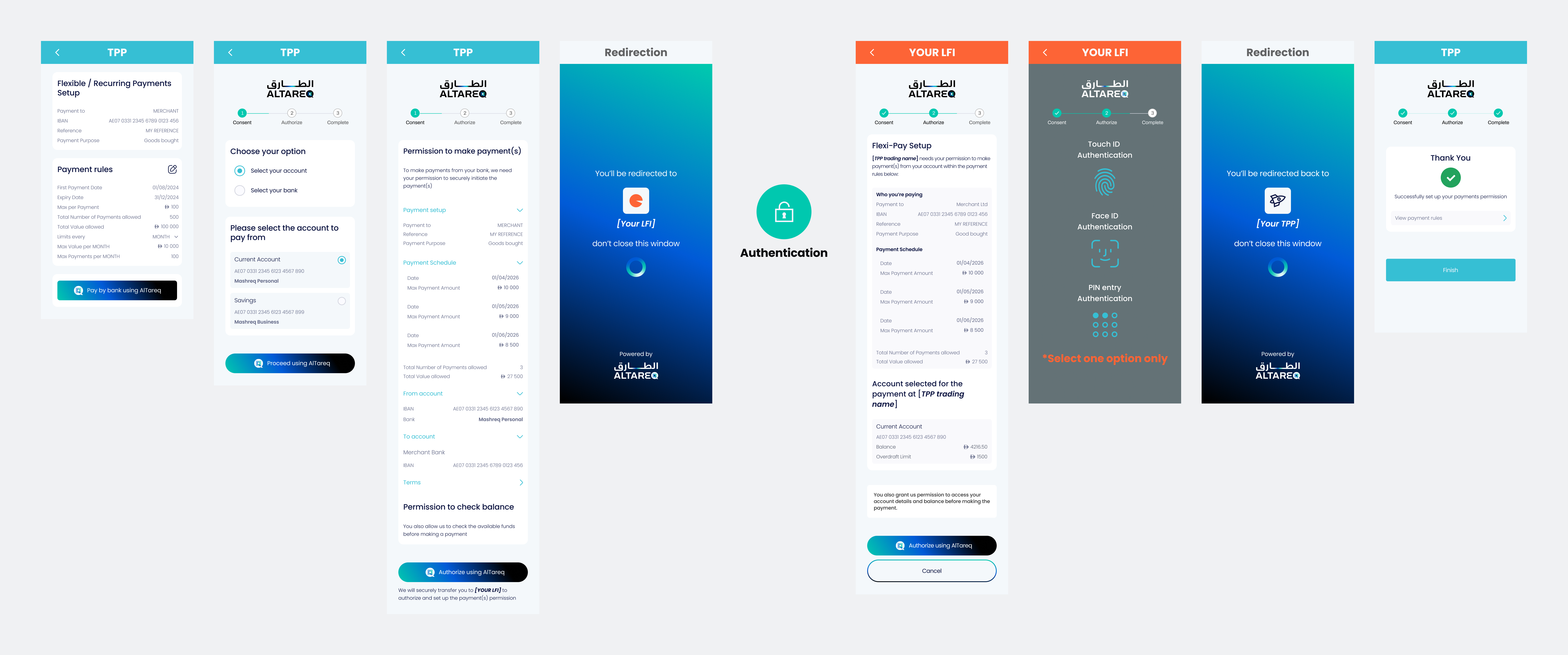
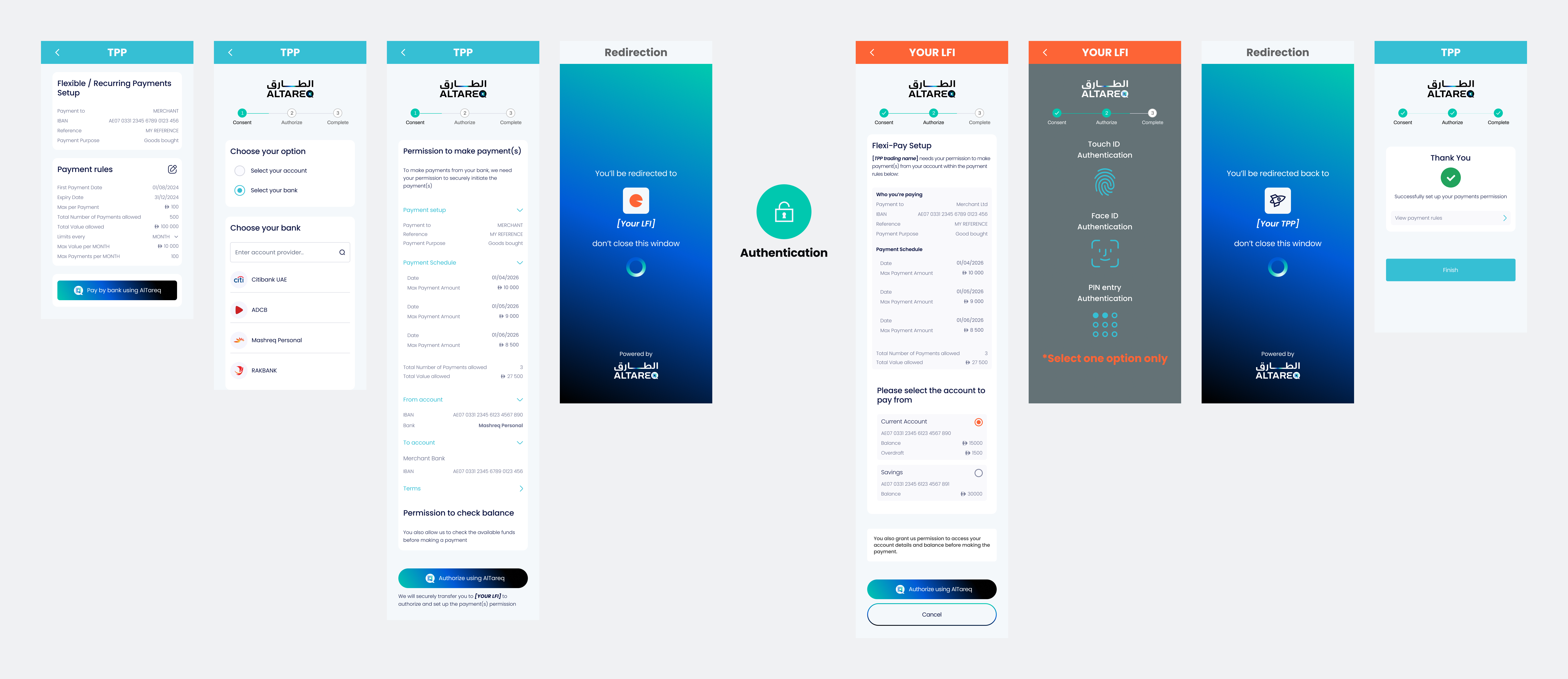
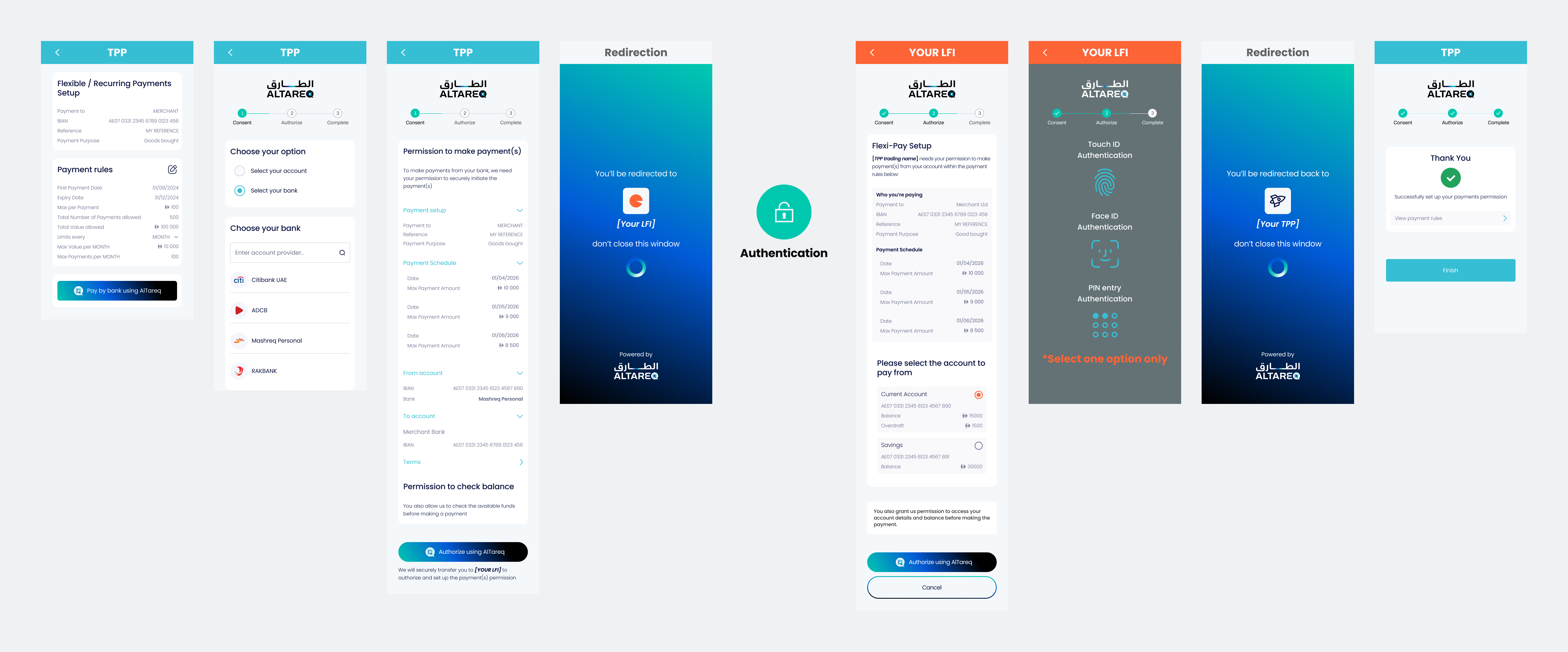
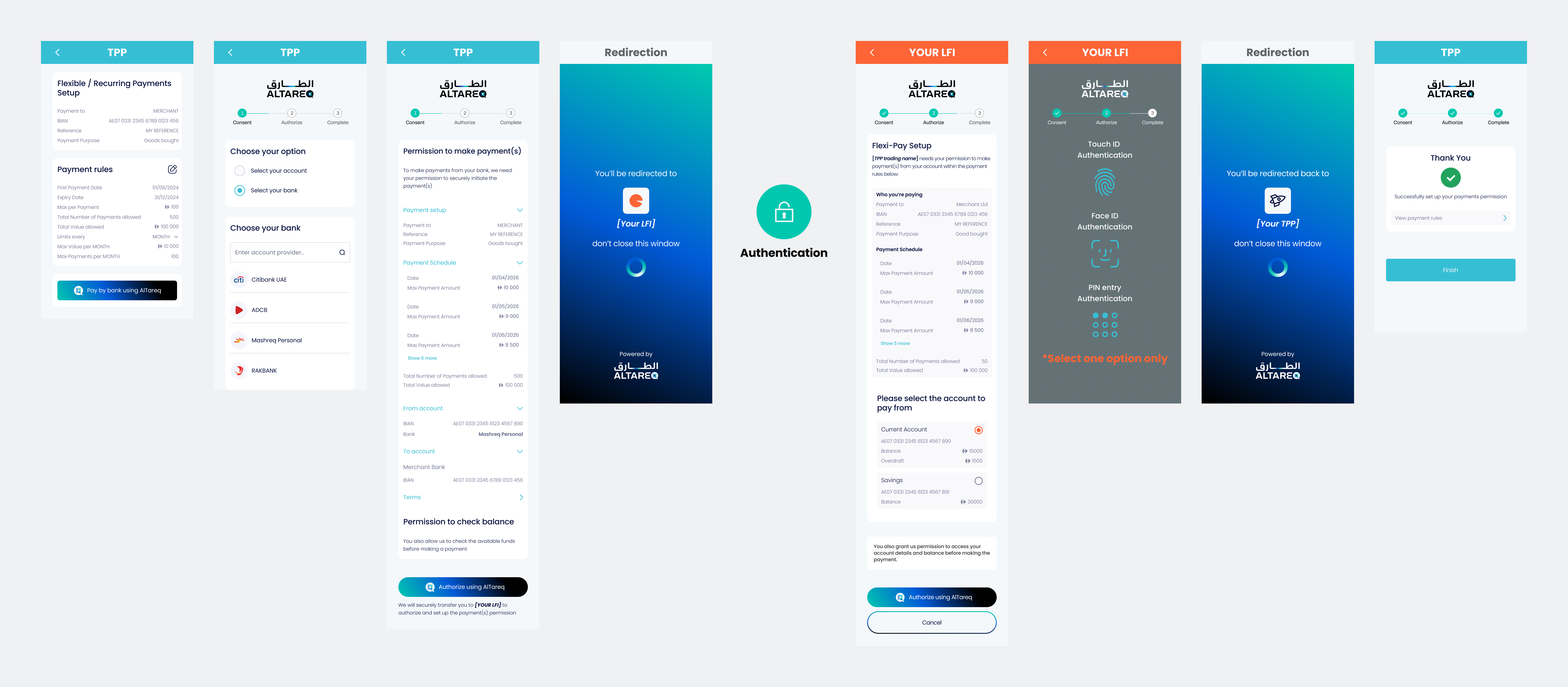
When a customer is redirected to you to authorize a Variable Defined Schedule payment consent through Open Finance, you must present an Authorization Page that clearly explains the payment the customer is authorizing — that a pre-defined series of payments will be made, each on a specific date and up to a variable maximum amount. The page must collect the customer's explicit and informed consent, and it must accurately reflect the key details of the consent (payee, the complete list of scheduled payment dates and the maximum amount for each, etc.)
The examples and interactive wireframes provided below define the expected structure, content, and behavior of the Authorization Page and must be followed.
While you may adapt visual elements such as color palette, fonts, and styling, you must not alter the meaning, clarity, or completeness of the payment information shown. The representation of AlTareq (including logos, naming, and action buttons) must be preserved at all times. The customer must be able to clearly understand what payment they are authorizing and that the authorization is part of the AlTareq ecosystem.
Your Authorization Page must be submitted as part of CX certification prior to production. Any material changes to a production Authorization Page must also be resubmitted for review and approval.
Customise the request body fields below and watch the Consent and Authorisation page previews update live.
Configure the mock accounts the authenticated user holds at their bank. The Authorisation Page will offer these accounts when the user picks a debtor account, or validate the Initiation.DebtorAccount against them when one is pre-selected by the TPP.
The presence or absence of Initiation.DebtorAccount in domestic_payment_pii determines whether the user selects their account at the LFI or if it is pre-selected by the TPP.
Passing a DebtorAccount reduces friction for users who have already selected their account within the TPP's own interface, but removes the user's ability to choose a different account at the LFI.
Control parameters define the spending rules for the consent and are displayed in the Payment rules card on both the TPP Consent Page and the LFI Authorisation Page.
There are two groups of control parameters: overall limits that apply across the full lifetime of the consent, and the payment schedule that defines each individual payment.
Overall limits (set at ControlParameters.ConsentSchedule.MultiPayment):
| Field | UI Label | Behaviour |
|---|---|---|
MaximumCumulativeNumberOfPayments | Total Number of Payments allowed | The maximum number of individual payments that can be made across the entire consent. Only shown when provided. |
MaximumCumulativeValueOfPayments | Total Value allowed | The maximum total amount that can be paid across the entire consent. Only shown when provided. |
Payment schedule (set at ControlParameters.ConsentSchedule.MultiPayment.PeriodicSchedule.Schedule):
Unlike periodic schedule types, a Defined Schedule specifies each payment individually. Each entry in the Schedule array defines exactly one payment:
| Field | UI Label | Behaviour |
|---|---|---|
PaymentExecutionDate | Date | The specific date on which this payment may be executed. Each date must be unique across the schedule. |
MaximumIndividualAmount | Max per Payment | The maximum amount allowed for this scheduled payment. Always shown. |
| (implicit) | Payments per Date | Only 1 payment is allowed per PaymentExecutionDate. Always enforced. |
Each schedule entry is shown as a row in the Payment schedule section of the UI, displaying the date on the left and the maximum amount on the right.
If an optional parameter is not provided in the API request, it must be omitted entirely from the User Experience — it must not be displayed as null or 0.
Correct — optional row not shown when parameter is absent:
Payment rules

Payment schedule
───────────────────────────────────────────
Date                             01/08/2026
Max Payment Amount                   500.00
Date                             02/09/2026
Max Payment Amount                  1200.00

Total Number of Payments allowed         3
───────────────────────────────────────────
Incorrect — optional row shown with a null or zero value:
Payment rules
───────────────────────────────────────────
Date                             01/08/2026
Max Payment Amount                   500.00
Date                             02/09/2026
Max Payment Amount                  1200.00

Total Number of Payments allowed         3
Total Value allowed                      0
───────────────────────────────────────────The presence or absence of creditors in Initiation.Creditor in domestic_payment_pii determines how the LFI presents payment recipient information to the user.
Initiation.Creditor | LFI Authorisation Page Behaviour |
|---|---|
| 1 creditor | The single payee's name and account details are displayed under "Who you're paying". (See Example 1) |
| 2–10 defined creditors | Not Supported |
| Undefined (absent or empty) | Not Supported |
The table below describes the text shown to users on the Authorization Page.
| Permissions | Text shown to user on Authorization Page |
|---|---|
ReadAccountsBasic | We are also providing access to your account details before making the payment. |
ReadAccountsDetail | We are also providing access to your account details before making the payment. |
ReadRefundAccount | We are also providing access to your account details in order to process a refund. |
ReadAccountsBasicReadAccountsDetail | We are also providing access to your account details before making the payment. |
ReadAccountsBasicReadBalances | We are also providing access to your account details and balance before making the payment. |
ReadAccountsBasicReadRefundAccount | We are also providing access to your account details before making the payment, as well as to process refunds. |
ReadAccountsDetailReadBalances | We are also providing access to your account details and balance before making the payment. |
ReadAccountsDetailReadRefundAccount | We are also providing access to your account details before making the payment, as well as to process refunds. |
ReadAccountsBasicReadAccountsDetailReadBalances | We are also providing access to your account details and balance before making the payment. |
ReadAccountsBasicReadAccountsDetailReadRefundAccount | We are also providing access to your account details before making the payment, as well as to process refunds. |
ReadAccountsBasicReadBalancesReadRefundAccount | We are also providing access to your account details and balance before making the payment, as well as to process refunds. |
ReadAccountsDetailReadBalancesReadRefundAccount | We are also providing access to your account details and balance before making the payment, as well as to process refunds. |
ReadAccountsBasicReadAccountsDetailReadBalancesReadRefundAccount | We are also providing access to your account details and balance before making the payment, as well as to process refunds. |